Generating Software Bill of Materials
Overview
The SBOM-Generator extension automatically creates Software Bill of Materials (SBOM) documents for OCM resources. It uses Syft to scan artefacts and stores the generated SBOMs in ODG blob storage for retrieval via the dashboard or API.
How It Works
Component Scanning Process
When a component is picked up for scanning, the SBOM-Generator:
Resolves the component descriptor from configured OCM repositories
Retrieves each Resource from the component
Scans using Syft CLI via subprocess
The scanning approach varies by resource type:
Resource Type Handling
ociRegistry Resources
: The image reference is passed directly to the Syft CLI.
localBlob/v1 Resources
: The blob is downloaded to a temporary file before scanning.
s3 Resources
: The tar archive is downloaded and extracted to a temporary directory
before scanning.
SBOM Storage and Metadata
Once the SBOM is produced:
Serialisation: The SBOM is serialised to JSON
Hashing: A SHA-256 hash is computed
Upload: The SBOM is uploaded to the ODG blob storage
Metadata Recording: The digest, file size, and output format are recorded as
ArtefactMetadataof typeartefact_scan_infofor that resource
The dashboard queries this metadata to determine whether an SBOM is ready for download.
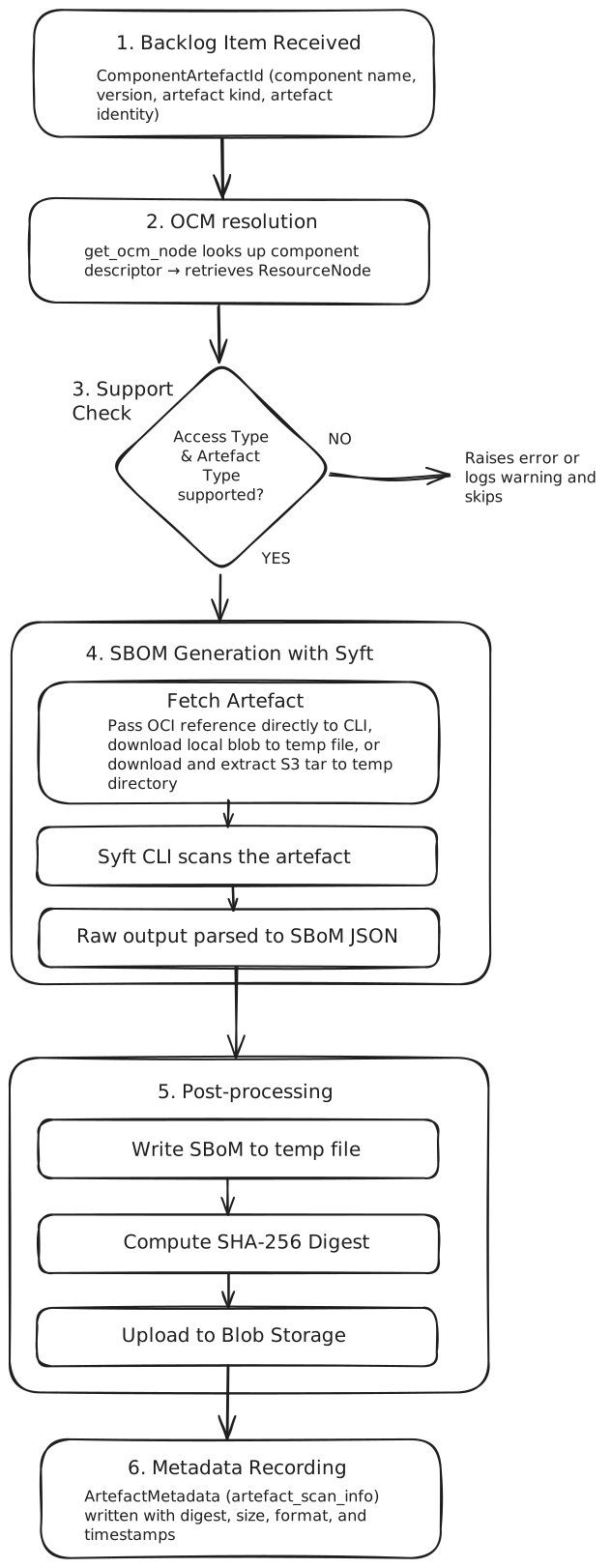
Generation Flow
The diagram below shows the end-to-end generation flow:
Supported Output Formats
The SBOM-Generator supports two standard SBOM formats:
CycloneDX (default)
SPDX
The format is configurable per ODG instance.
Rescanning Behaviour
Components are automatically rescanned based on the configured interval
(default: 24 hours). This ensures that SBOMs remain up-to-date as component
resources change.